.png)

With Dayspring, you can. The better way for SMBs to manage policies and procedures.
How Dayspring Works
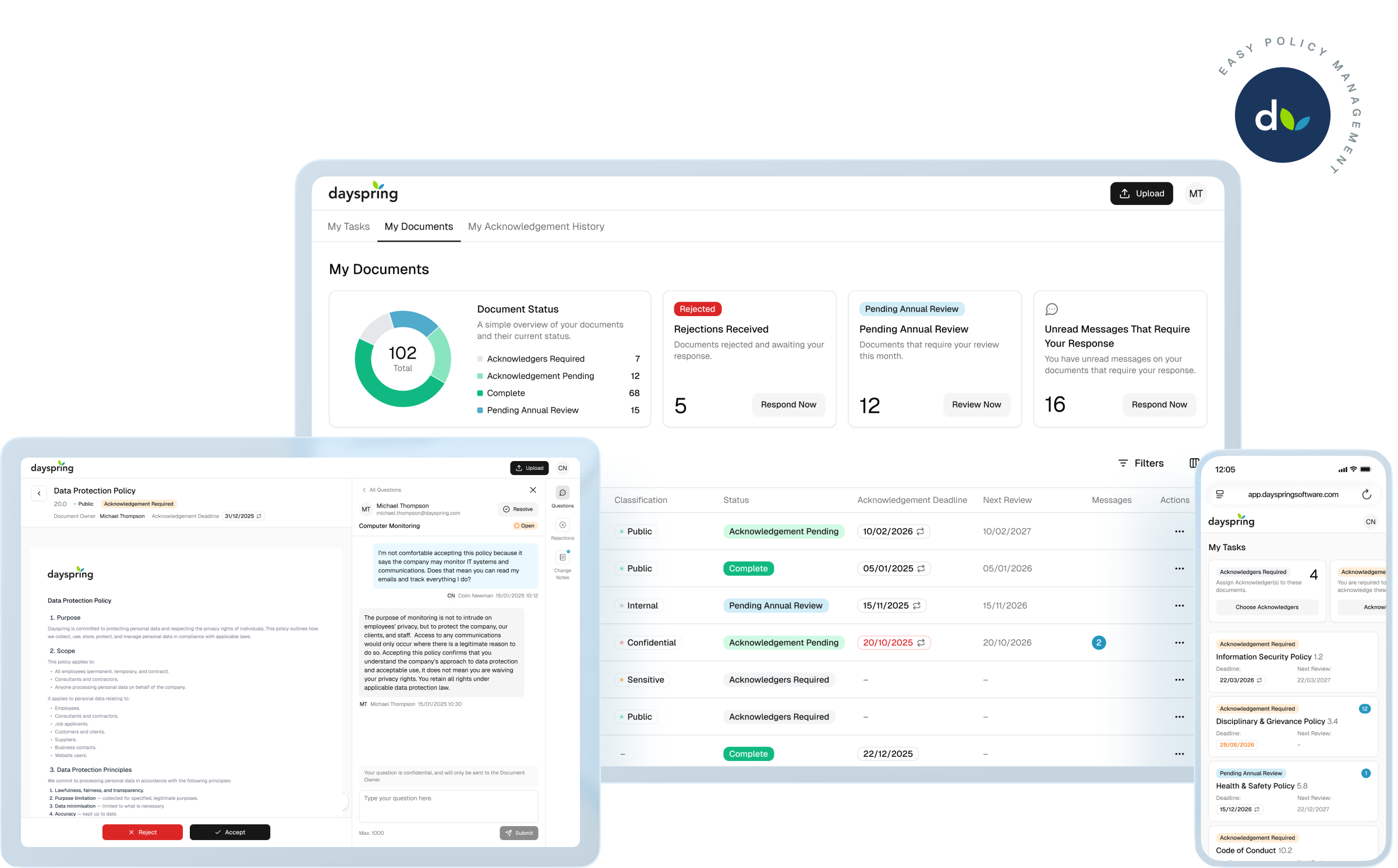
Dayspring is the policy management platform for SMBs that face regular audits and inspections and need to evidence document governance.
.jpg)

Companies that need to demonstrate formal policy management to enterprise customers and prospects — through RFIs, vendor questionnaires, or audits — to win and retain contracts.

SMBs pursuing or maintaining ISO 9001 or ISO 27001 who need to demonstrate structured policy management processes in response to the questions auditors ask, without the complexity of compliance automation platforms designed for much larger teams.

Professional services firms — law firms, accountancies, consultancies — who need to demonstrate formal policy governance to regulators and professional indemnity insurers — where the consequences of poor policy management range from fines and sanctions to uninsurability.
Dayspring combines AI-powered automation with structured policy management workflows to ensure you can answer the questions auditors, regulators, insurers and clients ask: is this policy up-to-date, who owns it, what changed between versions, do staff know and follow this policy, and when was it last reviewed?

Version-Specific Acknowledgment Records

Centralized Document Storage

AI-Driven Policy Comparison

Policy Change Tracking

Exportable, Audit-Ready Reports

Version History Records

ISO 27001 Compliant Platform

Policy Access Control

Scheduled Annual Review Cycles

Accept, Reject or Question Workflows

Information Classification Labels
Acknowledgement Reports answer the questions organisations are routinely asked: Who has access to this policy? Who has agreed to its contents? Who hasn’t, and why? The reports are version-specific, immutable and time-stamped to provide evidence that policies and compliance documents are communicated and acknowledged across your staff, contractors and suppliers.
Dayspring’s automated version control prevents duplicate or conflicting copies, archives old versions automatically, and allows instant rollback of archived versions whenever needed.
Document version control is the process of tracking, managing, and storing changes to documents over time—so your team always works from the latest approved policy, with a clear, auditable history of every version. It replaces manual file naming like “Policy_V2.0” or “Final_v3” with structured, automatic tracking.
Change Management is the structured process of updating and reviewing policies when regulations change, audit findings arise, new risks emerge, or mandatory review cycles fall due. It proves you didn’t just upload a new version—you formally reviewed the document, assessed what needs to change, and controlled the update in line with regulatory and certification requirements.
With Dayspring’s automated Change Management workflows, when auditors ask, “What changed, and how do you know this was updated on time?” there’s no scrambling through emails or file histories. Every document contains a clear, time-stamped record of what changed, why it changed, and when.
Version History provides a clear, time-stamped record of each published version of a policy or procedure. It shows when a new version was uploaded, archived, or restored.
With Dayspring’s Version History report, you can view archived versions and the associated Change Notes explaining what has changed between versions, and roll back to a previous version with a clear record that the rollback occurred. The full history can be exported as a PDF or CSV report—ready for audits, inspections, investigations, or governance reporting.
.jpg)
%20(1).jpg)
.jpg)
.jpg)
%20(1).jpg)
.jpg)
.jpg)
%20(1).jpg)
.jpg)
.jpg)
%20(1).jpg)
.jpg)
Dayspring replaces your patchwork of manual document processes with a single, secure, and intuitive hub for managing your compliance documentation.
.jpg) Book a Demo
Book a Demo


.jpg)
%20(1).jpg)
.jpg)
%20(1).jpg)
.jpg)
.jpg)
%20(1).jpg)
.jpg)
.jpg)
%20(1).jpg)
.jpg)
.jpg)
%20(1).jpg)
.jpg)
.jpg)